 by The Cubist
September 21, 2013

 The Game Boy Player is one of only a few add-ons that Nintendo has released to the American market. It hit North American shelves on June 24th, 2003 and enjoyed a 4 to 5 year commercial life. The add-on fit on the bottom of Nintendo’s GameCube with the intended purpose of playing game boy , Game Boy Color, and Game Boy Advance games on a regular TV screen and with the GameCube controller if desired. In fact, aside from multiplayer modes, one could experience all the joy and woes of Nintendo’s entire Game Boy line without ever needing an actual Game Boy. The device functions near flawlessly, and it’s strange that it’s not a more well-known piece of hardware. Perhaps it was the inconspicuous design? The lack of any interesting logos or bulky lobes protruding from the GameCube to set it apart? I can’t be sure, but I totally appreciate its unobtrusive design. The Game Boy Player is like a flip-flop for the GameCube without the strap.
 In the past, several 3rd party add-ons have been designed for other systems for similar purposes (see Nerd Berry’s GameBooster review) but most ran some type of emulation software, identical to how one would play an older title on a computer. The Game Boy Player instead uses hardware very similar to a GBA itself. It connects to one of the many (read: 3) available ports on the underside of the GameCube. I’m not sure what they are all called or what their functions are, but it’s easy to tell where the Game Boy Player fits due to its shape. Besides plugging in, screws at all 4
 corners make sure it’s held in place. There is also a handy eject button to keep one from having to lift up the GameCube for every game change. Aside from the add-on, a boot disc is also required. I’m not sure if there was some great reason Nintendo chose or was forced to implement this disc, but it has really hurt the aftermarket sales. Without the disc, it’s worthless; an ugly paperweight at best. Luckily, I did my homework and made sure to purchase a unit with a boot disc and I can testify first hand that without the boot disc absolutely nothing happens.

99% of anything that’s ever fit into any Game Boy will work in the Game Boy Player. There is some caution regarding a few unspecified original Game Boy games, but it assures that all Color and Advance games will work. However, there were a few Game Boy games that had some extra (albeit limited) functionality when used in conjunction with the Super Game Boy for the SNES, and the extra bit (colored borders) is not supported. Any and all Game Boy peripherals are also fully compatible, but some connections can lead to awkward configurations where it may be necessary to prop the GameCube up or hang it slightly off an edge. The e-Reader, Game Shark SP (both models) and Game Boy Game Genie can all mechanically fit and are all electronically compatible. The Game Boy Micro has bizarre, non-standard link ports, so unfortunately does not work with the Game Boy Player. Sorry Game Boy Micro folks.
 There is also an Options Menu outside of the proper Game Boy / Color / Advance software that can control things like screen size, border color, and the blur caused by some games, especially when blown up to the size of a TV. Controller settings can also be changed; one can either use the GameCube controller to play, or hook up a GBA with a GameCube/GBA link cable. The picture on the right shows one of many interesting configurations: the GC controller is in port 1, an original GBA is in port 2, and a GBA SP is plugged into the link cable port of the Game Boy Player. Multiplayer can be used to an extent, but not directly by plugging in multiple controllers. Instead, the Game Boy Player interprets all controller input as a single player. This allows for a sort of unauthorized co-op play on some games, and provides more practicality when dealing with multiplayer games that require the Game Boy to be passed from one person to the next.
To get the full multiplayer experience, something else needs to be connected via the link port on the Game Boy Player so that the software recognizes a second unit. One can either link the add-on directly to a GBA with a link cable (which will only apply to GBA games nevermind, this is not true since the GBA can play original and Color games), or actually outfit a second GameCube with a second Game Boy Player and connect the two Game Boy Players with a link cable. Of course this set-up will also require 2 televisions and likely 2 copies of the game. When I grow up and reap the millions from Nerd Bacon, I’m going to set up my very own room with 4 of these bitches all linked up.
I’m sure there’s more technical stuff I’m missing, but I’ve certainly hit the basics. Admittedly I haven’t experimented much with original or Color games, but this is a great way to enjoy some of the amazing titles for the GBA. There’s been plenty of times where I’ve been really into a GBA game while out somewhere only to curl up in a corner after getting home, with cramped hands and a short charging cable just to continue my game. Then, I realize I can use the Game Boy Player enjoy this game on my TV, play with the infinitely more comfortable GameCube Controller, and not have to worry about any battery life.
 The Game Boy Player may not be the most unique add-on ever to grace a gamer’s den, but it gets a ton of points for doing what it does well, fitting in so well with the GameCube’s size and shape, and covering a massive range of titles. Besides the portability aspect, it can practically eliminate the need to buy a Game Boy, Game Boy Color, or GBA. (Yes, I realize in retrospect that the GBA alone negates the purpose of owning an original Game Boy or the Game Boy Color.) It almost captures the essence of the Super Game Boy as well. The only features left out from the SNES add-on are colored borders anyway. Sadly, its very customized, GameCube-friendly shape kept it from moving over to the Wii. But oh well, I don’t even play GameCube games on the Wii anyway. I play them on the damn GameCube.
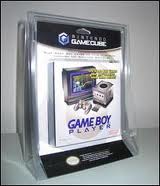
If you’ve ever thought about getting one, go ahead, you’ll be glad you did. If you’ve never heard of it but love any iteration of the Game Boy, I’d also recommend getting one of your own. Whatever you do though, be sure it has a boot disc. You need it. Really. (Officially known as a “Start-Up Disc” for those of you scrambling to Amazon and eBay.) Nintendo has long been known for saving a few of their best titles for handhelds, and this is a great way to enjoy them without the disappointing “man, I really want to play this game but it’s on a fucking handheld” moment. Now if only I could play DS / 3DS games on the Wii U…Paper Mario Sticker Star…Luigi’s Mansion: Dark Moon…Donkey Kong Country Returns 3D…Super Mario 3D Land…so many titles confined to the portables.
Maybe now I’ll get around to all the Super Mario Land games…
Reviewed by The Cubist
[…] are a touch better than those of the original NES version, especially when played through the Game Boy Player on an actual TV. Controls are also improved, and there is a noticeable difference when pulling […]
[…] that I’ve been exploring as of late I’ve been able to play on the big screen via the Game Boy Player peripheral for the GameCube. I still have so many other great 3DS titles to play through that […]

I actually have one of these, but its only function was to trade pokemon between games. As for the others slots under the 'cube, one of them is for an adapter to connect to the internet to play some games online. I have one of them, Phantasy Star Online Episode 1 & 2 Plus, but no adapter. There were only 3 games that had online connectivity (phantasy star online 3, Homeland) and 3 LAN games (Mario Kart DD, 1080 Avalanche, Kirby Air Ride)
If you have one, it's a great way to take GBA games off the small screen, you can do way more than swap around Pokemon. If you have the boot disc, of course. I think Nerd Berry mentioned having a GC Lan adapter to me recently...
[…] hours with the cartridge awkwardly hanging out of one of my 3 GBAs, I then stuck it into the Game Boy Player add-on for the GameCube, and after a few more hours of being hopelessly stuck at the end of the […]
[…] job at making the most of the Game Boy’s limited technology. Once again I used a GBA and Game Boy Player to make my way through the game, along with a GameShark Pro which you can read more about in my […]
[…] piqued. After playing on the GBA for awhile and enduring a few crashes, I moved over to the Game Boy Player on the GameCube to finish things up. Now, a few hours later, I’ve dug out the Super Game […]
[…] series. Having had a great deal of fun playing my Castlevania Game Boy games on my TV via the Game Boy Player and GameCube, I decided it was time to experience what I never had as a kid. […]
[…] more, more!” at its conclusion, this is the game to check out. With the ability of the Game Boy Player to display SMB Deluxe onto the big screen via Nintendo’s GameCube, there’s no excuse […]
[…] development surrounding the GBA was the adaptation of its hardware into a GameCube add-on. The Game Boy Player, as it was known, could be affixed to the underside of the GameCube and provided support for […]
[…] a handheld gaming device. Much of the time I enjoy GBA games via the GameCube thanks to the Game Boy Player add-on. However, after spending some time away from my usual arsenal of consoles (on vacation), […]


Comments